Model Configuration
For a more intuitive and efficient setup experience, we recommend configuring models in the Web UI first.
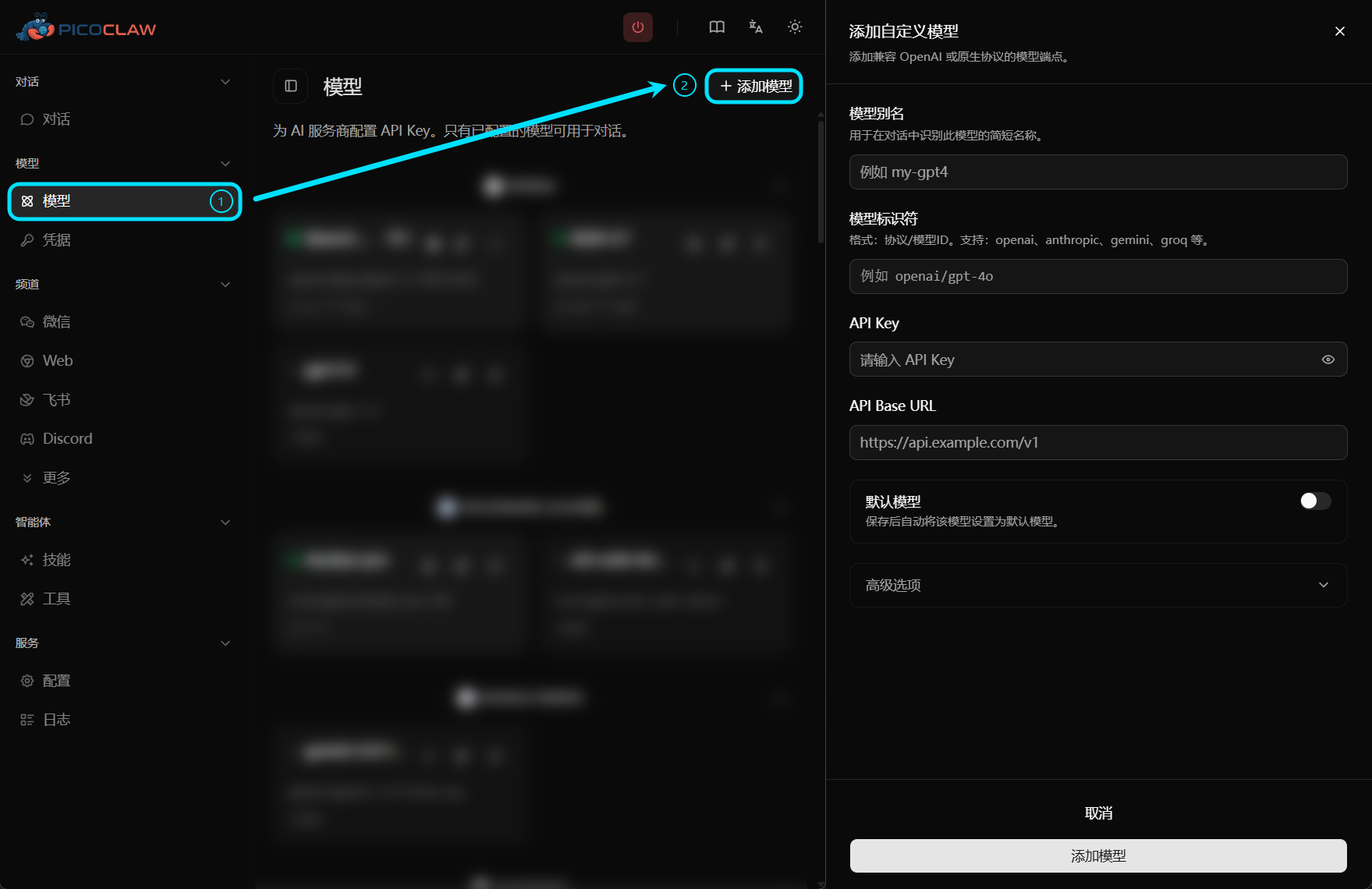
You can still manage models manually in config.json when you need automation or template-based deployment.
PicoClaw uses a model-centric configuration approach. Simply specify vendor/model-id to connect a provider protocol.
This enables multi-agent support with flexible provider selection:
- Different agents, different providers: Each agent can use its own LLM provider
- Model fallbacks: Configure primary and fallback models for resilience
- Load balancing: Distribute requests across multiple endpoints
- Centralized configuration: Manage all providers in one place
Supported Vendors and Protocols
| Vendor | model Prefix | Default API Base | Protocol | Get API Key |
|---|---|---|---|---|
| OpenAI | openai/ | https://api.openai.com/v1 | OpenAI | Get Key |
| Anthropic | anthropic/ | https://api.anthropic.com/v1 | Anthropic | Get Key |
| Anthropic Messages | anthropic-messages/ | https://api.anthropic.com/v1 | Anthropic Messages | Get Key |
| Azure OpenAI | azure/, azure-openai/ | Custom Azure endpoint | Azure OpenAI | Azure Portal |
| AWS Bedrock | bedrock/ | AWS region or runtime endpoint | Bedrock | AWS credentials |
| Venice AI | venice/ | https://api.venice.ai/api/v1 | OpenAI-compatible | Get Key |
| OpenRouter | openrouter/ | https://openrouter.ai/api/v1 | OpenAI-compatible | Get Key |
| LiteLLM | litellm/ | http://localhost:4000/v1 | OpenAI-compatible | Local proxy |
| LM Studio | lmstudio/ | http://localhost:1234/v1 | OpenAI-compatible | Optional (local default: no key) |
| Groq | groq/ | https://api.groq.com/openai/v1 | OpenAI-compatible | Get Key |
| Zhipu AI (GLM) | zhipu/ | https://open.bigmodel.cn/api/paas/v4 | OpenAI-compatible | Get Key |
| Google Gemini | gemini/ | https://generativelanguage.googleapis.com/v1beta | OpenAI-compatible | Get Key |
| NVIDIA | nvidia/ | https://integrate.api.nvidia.com/v1 | OpenAI-compatible | Get Key |
| Ollama | ollama/ | http://localhost:11434/v1 | OpenAI-compatible | Local (no key needed) |
| Moonshot | moonshot/ | https://api.moonshot.cn/v1 | OpenAI-compatible | Get Key |
| ShengSuanYun | shengsuanyun/ | https://router.shengsuanyun.com/api/v1 | OpenAI-compatible | Get Key |
| DeepSeek | deepseek/ | https://api.deepseek.com/v1 | OpenAI-compatible | Get Key |
| Cerebras | cerebras/ | https://api.cerebras.ai/v1 | OpenAI-compatible | Get Key |
| Vivgrid | vivgrid/ | https://api.vivgrid.com/v1 | OpenAI-compatible | Get Key |
| VolcEngine | volcengine/ | https://ark.cn-beijing.volces.com/api/v3 | OpenAI-compatible | Get Key |
| vLLM | vllm/ | http://localhost:8000/v1 | OpenAI-compatible | Local |
| Qwen (CN) | qwen/ | https://dashscope.aliyuncs.com/compatible-mode/v1 | OpenAI-compatible | Get Key |
| Qwen (Intl) | qwen-intl/ | https://dashscope-intl.aliyuncs.com/compatible-mode/v1 | OpenAI-compatible | Get Key |
| Qwen (US) | qwen-us/ | https://dashscope-us.aliyuncs.com/compatible-mode/v1 | OpenAI-compatible | Get Key |
| Coding Plan | coding-plan/ | https://coding-intl.dashscope.aliyuncs.com/v1 | OpenAI-compatible | Get Key |
| Coding Plan (Anthropic) | coding-plan-anthropic/ | https://coding-intl.dashscope.aliyuncs.com/apps/anthropic | Anthropic-compatible | Get Key |
| Mistral | mistral/ | https://api.mistral.ai/v1 | OpenAI-compatible | Get Key |
| Avian | avian/ | https://api.avian.io/v1 | OpenAI-compatible | Get Key |
| Minimax | minimax/ | https://api.minimaxi.com/v1 | OpenAI-compatible | Get Key |
| LongCat | longcat/ | https://api.longcat.chat/openai | OpenAI-compatible | Get Key |
| ModelScope | modelscope/ | https://api-inference.modelscope.cn/v1 | OpenAI-compatible | Get Key |
| Novita | novita/ | https://api.novita.ai/openai | OpenAI-compatible | Get Key |
| MiMo | mimo/ | https://api.xiaomimimo.com/v1 | OpenAI-compatible | Get Key |
| Antigravity | antigravity/ | Google Cloud | OAuth | OAuth only |
| GitHub Copilot | github-copilot/ | localhost:4321 | gRPC | — |
| Claude CLI | claude-cli/ | N/A | CLI | Local CLI auth |
| Codex CLI | codex-cli/ | N/A | CLI | Local CLI auth |
Protocol aliases are also supported, for example: qwen-international/dashscope-intl, dashscope-us, alibaba-coding, qwen-coding, alibaba-coding-anthropic, copilot, claudecli, and codexcli.
Any Compatible Model via Custom API Base
You are not limited to the vendors listed above. You can use openai/ or anthropic/ with a third-party api_base to connect any OpenAI-compatible or Anthropic-compatible model.
{
  "model_name": "my-custom-model",
  "model": "openai/my-custom-model",
  "api_base": "https://custom-api.com/v1",
  "api_keys": ["YOUR_API_KEY"]
}
Recommended Configuration Pattern
In config schema version 2, keep model structure in config.json and place credentials in .security.yml.
The snippets below focus on model-related fields. In a full config file, keep top-level "version": 2.
{
  "model_list": [
    {
      "model_name": "gpt-5.4",
      "model": "openai/gpt-5.4"
    },
    {
      "model_name": "claude-sonnet-4.6",
      "model": "anthropic/claude-sonnet-4-6"
    },
    {
      "model_name": "lmstudio-local",
      "model": "lmstudio/openai/gpt-oss-20b"
    }
  ],
  "agents": {
    "defaults": {
      "model_name": "gpt-5.4"
    }
  }
}
# ~/.picoclaw/.security.yml
model_list:
  gpt-5.4:0:
    api_keys:
      - "sk-openai-..."
  claude-sonnet-4.6:0:
    api_keys:
      - "sk-ant-..."
Model Entry Fields
| Field | Type | Required | Description |
|---|---|---|---|
model_name | string | Yes | Alias used in agents.defaults.model_name |
model | string | Yes | vendor/model-id format. The leading vendor/ is used for protocol/API base resolution only and is not sent to the upstream API as-is. |
api_keys | array | Depends | API keys for this model. Put credentials in .security.yml whenever possible. |
api_base | string | No | Override default API base URL |
auth_method | string | No | Authentication method (e.g., oauth) |
connect_mode | string | No | Connection mode (e.g., grpc, stdio) |
proxy | string | No | HTTP/SOCKS proxy for this model's API calls |
user_agent | string | No | Custom User-Agent header for API requests |
request_timeout | int | No | Request timeout in seconds (default: 120) |
rpm | int | No | Rate limit — requests per minute (see Rate Limiting) |
api_key in config.jsonFor config schema version 2, model_list[].api_key in config.json is ignored. Use .security.yml with api_keys for model credentials. Legacy api_key values are only merged during V0/V1 migration.
How model Prefix Resolution Works
openai/gpt-5.4-> protocol isopenai, outbound model isgpt-5.4lmstudio/openai/gpt-oss-20b-> protocol islmstudio, outbound model is normalized toopenai/gpt-oss-20bopenrouter/openai/gpt-5.4-> protocol isopenrouter, outbound model isopenai/gpt-5.4
Vendor Examples
OpenAI
{
  "model_name": "gpt-5.4",
  "model": "openai/gpt-5.4"
}
VolcEngine (Doubao)
{
  "model_name": "ark-code-latest",
  "model": "volcengine/ark-code-latest"
}
Anthropic (Claude)
{
  "model_name": "claude",
  "model": "anthropic/claude-sonnet-4-6"
}
Run
picoclaw auth login --provider anthropicto paste your API token.
OpenRouter
{
  "model_name": "openrouter-gpt",
  "model": "openrouter/openai/gpt-5.4"
}
LM Studio (Local)
{
  "model_name": "lmstudio-local",
  "model": "lmstudio/openai/gpt-oss-20b"
}
api_base defaults to http://localhost:1234/v1. API key is optional unless your LM Studio server enables authentication.
Azure OpenAI
{
  "model_name": "azure-gpt5",
  "model": "azure/my-gpt5-deployment",
  "api_base": "https://your-resource.openai.azure.com"
}
Ollama (Local)
{
  "model_name": "llama3",
  "model": "ollama/llama3"
}
Bedrock
{
  "model_name": "bedrock-claude",
  "model": "bedrock/us.anthropic.claude-sonnet-4-20250514-v1:0",
  "api_base": "us-east-1"
}
Custom OpenAI-Compatible Endpoint
{
  "model_name": "my-proxy-model",
  "model": "openai/custom-model",
  "api_base": "https://my-proxy.com/v1"
}
Per-Model Request Timeout
{
  "model_name": "slow-model",
  "model": "openai/o1-preview",
  "request_timeout": 300
}
Load Balancing
Configure multiple entries with the same model_name and PicoClaw will round-robin them:
{
  "model_list": [
    {
      "model_name": "gpt-5.4",
      "model": "openai/gpt-5.4",
      "api_base": "https://api1.example.com/v1"
    },
    {
      "model_name": "gpt-5.4",
      "model": "openai/gpt-5.4",
      "api_base": "https://api2.example.com/v1"
    }
  ]
}
Migration from Legacy providers
Legacy providers is not part of config schema version 2. PicoClaw only keeps migration compatibility for old V0/V1 configs and converts them to model_list during load.
In a complete schema v2 config file, keep top-level "version": 2.
Old Config (deprecated):
{
  "providers": {
    "zhipu": {
      "api_key": "your-key",
      "api_base": "https://open.bigmodel.cn/api/paas/v4"
    }
  },
  "agents": {
    "defaults": {
      "provider": "zhipu",
      "model_name": "glm-4.7"
    }
  }
}
New Config (recommended):
{
  "model_list": [
    {
      "model_name": "glm-4.7",
      "model": "zhipu/glm-4.7"
    }
  ],
  "agents": {
    "defaults": {
      "model_name": "glm-4.7"
    }
  }
}
See the full Migration Guide for details.
Voice Transcription
Groq provides free voice transcription via Whisper. If configured, Telegram voice messages will be automatically transcribed.
{
  "model_list": [
    {
      "model_name": "whisper",
      "model": "groq/whisper-large-v3"
    }
  ]
}