SiliconFlow API Configuration Guide
Overview
SiliconFlow is a platform providing cost-effective LLM inference services, supporting various open-source and commercial models (such as DeepSeek, Qwen, LLaMA, etc.).
Key features:
- High-performance inference (optimized for inference)
- Low cost (cheaper than official APIs)
- OpenAI-compatible interface (direct integration with existing tools)
- China-friendly access (no complex proxy needed)
Popular models:
| Model | Provider | Features | Use Cases |
|---|---|---|---|
| deepseek-chat | DeepSeek | Strong overall capability | Daily conversations |
| deepseek-coder | DeepSeek | Strong coding ability | Programming tasks |
| qwen2-7b-instruct | Alibaba | Chinese optimized | Chinese scenarios |
| llama3-70b-instruct | Meta | Open-source LLM | General tasks |
Getting API Key
Step 1: Visit Platform
Go to SiliconFlow Cloud
Step 2: Sign In
Supports phone number or other registration methods.
Step 3: Create API Key
- Navigate to Console → API Key Management
- Click Create API Key
- Copy and save your Key
⚠️ Note: API Key is only shown once, please save it securely.
Configuring PicoClaw
Option 1: Using WebUI (Recommended)
PicoClaw provides a WebUI interface where you can easily configure models without manually editing configuration files.
Edit preset settings, or click the "Add Model" button in the top right corner:
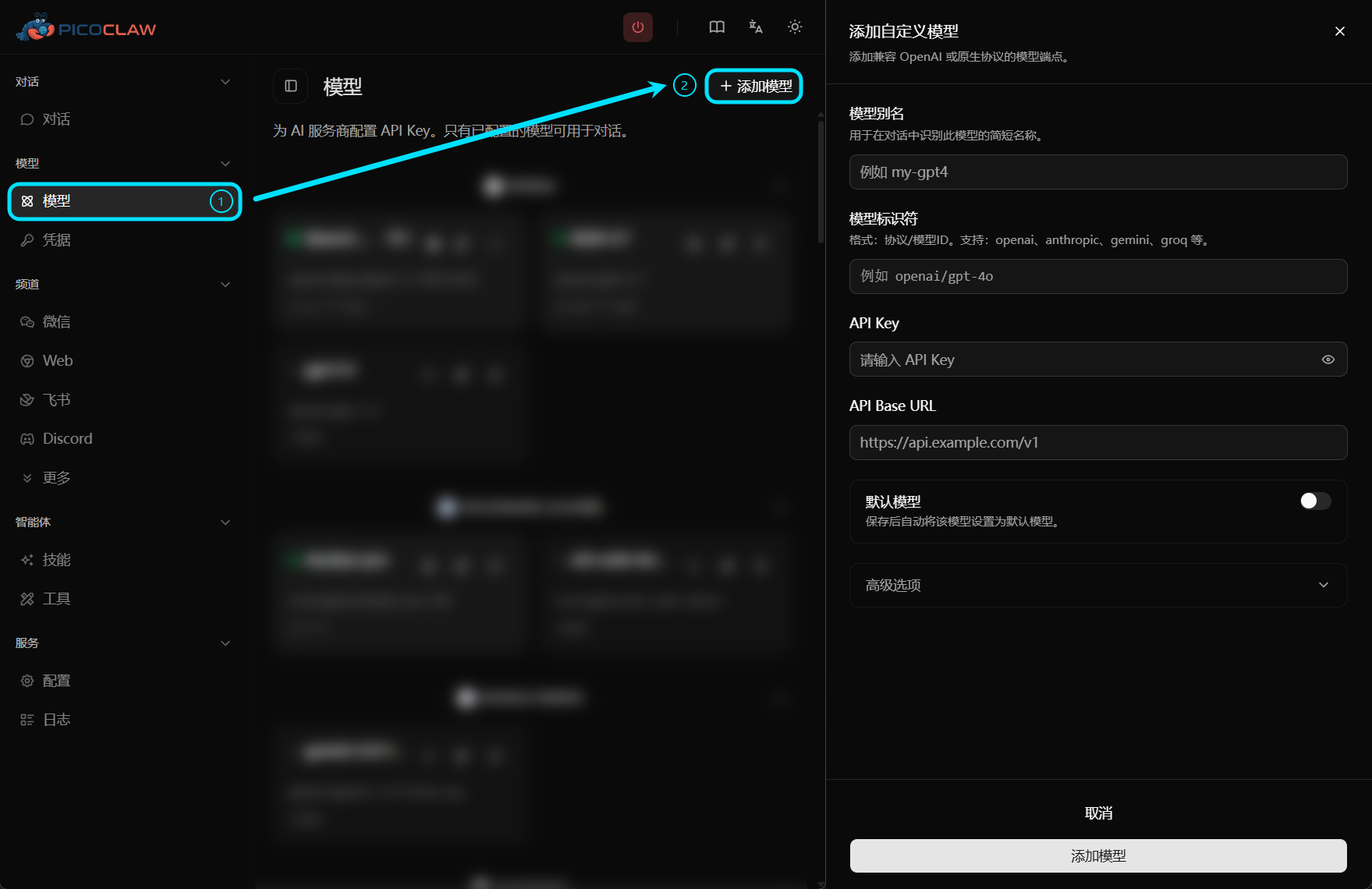
| Field | Value |
|---|---|
| Model Alias | Custom name, e.g., deepseek-chat |
| Model Identifier | deepseek-chat (or other supported models) |
| API Key | SiliconFlow API Key |
| API Base URL | https://api.siliconflow.cn/v1 |
Option 2: Edit Configuration File
Add in config.json:
{
  "model_list": [
    {
      "model_name": "deepseek-chat",
      "model": "deepseek-chat",
      "base_url": "https://api.siliconflow.cn/v1",
      "auth_method": "api_key",
      "api_key": "YOUR_SILICONFLOW_API_KEY"
    },
    {
      "model_name": "deepseek-coder",
      "model": "deepseek-coder",
      "base_url": "https://api.siliconflow.cn/v1",
      "auth_method": "api_key",
      "api_key": "YOUR_SILICONFLOW_API_KEY"
    }
  ],
  "agents": {
    "defaults": {
      "model": "deepseek-chat"
    }
  }
}
Limits & Quotas
Billing
SiliconFlow uses a pay-as-you-go model, charging based on the actual model used and token consumption.
Rate Limits
- Different models have different rate limits
- New users may have free quota
- Higher rate quotas available after topping up
Common Issues
Insufficient Balance
Cause: Account balance depleted
Solution: Top up in the console
Model Unavailable
Cause: Incorrect model name or model discontinued
Solutions:
- Check if model name is correct
- Check SiliconFlow documentation for available models